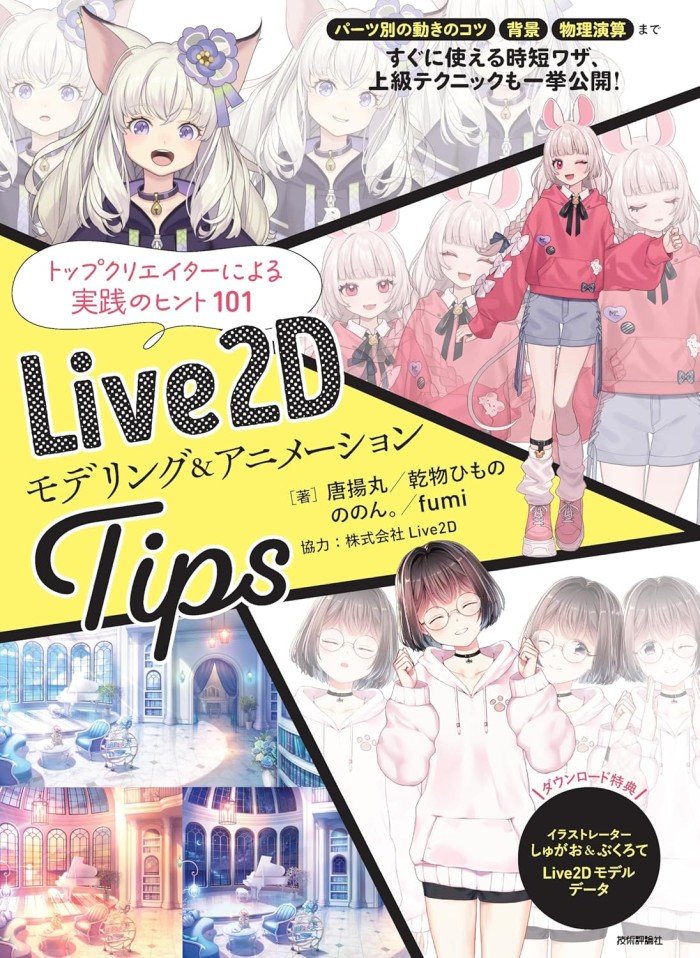
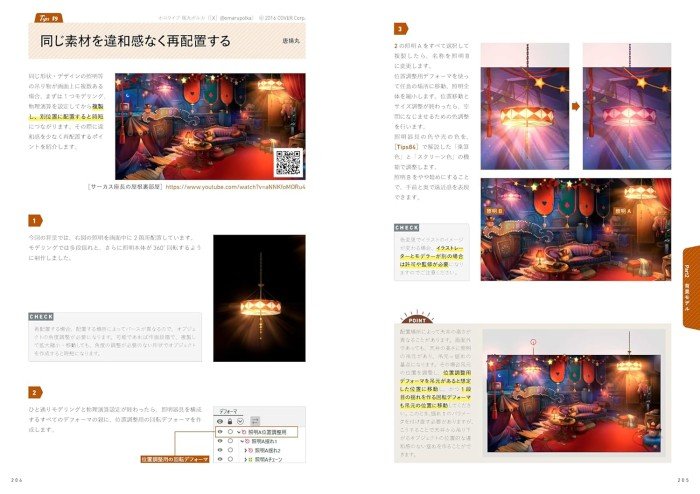
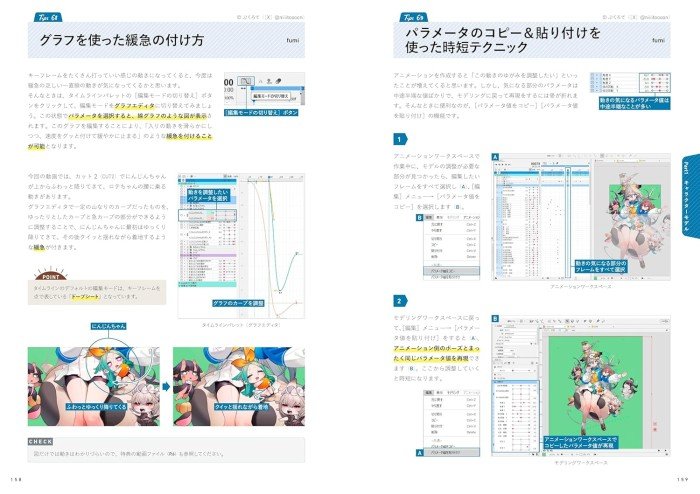
Live2D Modeling and Animation Tips Tutorial Book

Rp549.000

256 pages /B5 size / Japanese

Warning buku ini agak heavy text dan tidak rekomen untuk pemula di live2d ya!

A must-have book for anyone who wants to further evolve and create their models!

(Recommended for)
– People who want to improve the quality of their Live2D deliverables
– Live2D modelers who want to know the techniques of top creators
– Creators who want to animate their own illustrations

(Table of Contents)
Part 1 Character modeling
tips 1 Recommended illustration size
tips 2 Live2D Cubism left and right
tips 3 Tip for erasing bounding boxes
4 Tip for drawing center lines
5 Tip for making Artmesh with beautiful alternating triangles 6 Tip for
dividing meshes neatly along line drawings
7 Tip for dividing meshes according to materials and solid objects
8 Tip for dividing circular meshes neatly
9 Tip for applying meshes with strokes
10 Tip for placing illustrations in the center of the canvas
11 Recommended numerical values for automatic mesh generation
tips 12 Mirror editing for symmetrical modeling
tips 13 Quick reference chart for closed and open mouth shapes
tips 14 Efficient way to create the Japanese alphabet
tips 15 Easily add contour shadows
tips 16 Time-saving
tips for producing one eye 17 Reducing the discomfort of closed eyes – Tips for eyelashes
18 Reducing the discomfort of closed eyes –
Tips for adjusting the position of closed eyes 19 Reducing the discomfort of closed eyes – Tips for adjusting the width of closed eyes
20 Reducing the discomfort of closed eyes – Tips for adjusting the position of the eyeball
21 Reducing the discomfort of closed eyes –
Tips for adjusting the width and perspective of the eyeball 22 Reducing the discomfort of closed eyes –
Tips for making highlights more apparent 23 Tips for using clipping and inverting masks at the same time
24 Basic
tips for blend shapes 25 Tips for creating objects that sway with blend shapes
26
Tips for blend shape weighting 27 Tips for creating facial expression differences with blend shapes
28 Tips for using blend shapes for XY angles
29 Tips for adding movement more effectively with physics calculations
30 Tips for using physics calculations to make body movement follow face movement
31 Tips for separating parameters for tracking and physics calculations
32 Tips for creating parameters for bounding and delaying
33 Tips for making things look more realistic with delay expressions
34 Tips for making eyelashes sway when blinking
35 Tips for creating movement that matches breathing 36
Tips for making the shadow of the neck a separate part
37 Tips for adding knee movement
38 Tips for creating the sides of back hair
39 Tips for making whorls and knots separate parts
40 Tips for creating the nape of the neck and blending it in well-balanced ways
41 Tips for hair swaying using skinning
42 Tips for realistic and rich breast swaying
43 Tips for creating breast swaying that takes into account fleshiness
44 Tips for enhancing the three-dimensional feel of breasts
45 Tips for moving fingers that are not separated into parts
46 Tips for adding lining to skirts
47 Tips for easily making accessories and other parts glow
48 Tips for easily expressing light reflection 49 Tips
for easily creating the swaying of kemonomimi
50 Tips for using editing levels 1, 2, and
3 differently 51 Editing level 2 51 Tips for easily creating a mouth using and 3
52 Tips for making full use of the multi-key
53 Tips for easily creating angle Z deformations 54
Tips for disabling deformations
55 Tips for freely selecting parameter keys
56 Tips for smoothing movement of three or more parameter key points
57 Tips for the angle and magnification of texture atlases
58 Tips for easily selecting the desired part 59
Tips for easily selecting multiple parts
60 Tips for the basics of templates
61 Tips for parameter and physics calculation templates
62 Tips for saving time by using model images and original images
63 Tips for thinking about what you want to show in your video
64 Tips for creating storyboards
65 Tips for creating video storyboards
66 Tips for character modeling for video
67 Tips for creating keyframes
Tips 68 How to add speed using graphs
Tips 69 Time-saving techniques using parameter copy and paste
Tips 70 Tips for dividing parts into folders
Tips 71 Photoshop plug-in tips for dividing materials
Tips 72 AE plug-in
etc
59
order@Toagraphicbook

100 in stock

SKU: 15920842639 Category:

Description

256 pages /B5 size / Japanese

Warning buku ini agak heavy text dan tidak rekomen untuk pemula di live2d ya!

A must-have book for anyone who wants to further evolve and create their models!

(Recommended for)
– People who want to improve the quality of their Live2D deliverables
– Live2D modelers who want to know the techniques of top creators
– Creators who want to animate their own illustrations

(Table of Contents)
Part 1 Character modeling
tips 1 Recommended illustration size
tips 2 Live2D Cubism left and right
tips 3 Tip for erasing bounding boxes
4 Tip for drawing center lines
5 Tip for making Artmesh with beautiful alternating triangles 6 Tip for
dividing meshes neatly along line drawings
7 Tip for dividing meshes according to materials and solid objects
8 Tip for dividing circular meshes neatly
9 Tip for applying meshes with strokes
10 Tip for placing illustrations in the center of the canvas
11 Recommended numerical values for automatic mesh generation
tips 12 Mirror editing for symmetrical modeling
tips 13 Quick reference chart for closed and open mouth shapes
tips 14 Efficient way to create the Japanese alphabet
tips 15 Easily add contour shadows
tips 16 Time-saving
tips for producing one eye 17 Reducing the discomfort of closed eyes – Tips for eyelashes
18 Reducing the discomfort of closed eyes –
Tips for adjusting the position of closed eyes 19 Reducing the discomfort of closed eyes – Tips for adjusting the width of closed eyes
20 Reducing the discomfort of closed eyes – Tips for adjusting the position of the eyeball
21 Reducing the discomfort of closed eyes –
Tips for adjusting the width and perspective of the eyeball 22 Reducing the discomfort of closed eyes –
Tips for making highlights more apparent 23 Tips for using clipping and inverting masks at the same time
24 Basic
tips for blend shapes 25 Tips for creating objects that sway with blend shapes
26
Tips for blend shape weighting 27 Tips for creating facial expression differences with blend shapes
28 Tips for using blend shapes for XY angles
29 Tips for adding movement more effectively with physics calculations
30 Tips for using physics calculations to make body movement follow face movement
31 Tips for separating parameters for tracking and physics calculations
32 Tips for creating parameters for bounding and delaying
33 Tips for making things look more realistic with delay expressions
34 Tips for making eyelashes sway when blinking
35 Tips for creating movement that matches breathing 36
Tips for making the shadow of the neck a separate part
37 Tips for adding knee movement
38 Tips for creating the sides of back hair
39 Tips for making whorls and knots separate parts
40 Tips for creating the nape of the neck and blending it in well-balanced ways
41 Tips for hair swaying using skinning
42 Tips for realistic and rich breast swaying
43 Tips for creating breast swaying that takes into account fleshiness
44 Tips for enhancing the three-dimensional feel of breasts
45 Tips for moving fingers that are not separated into parts
46 Tips for adding lining to skirts
47 Tips for easily making accessories and other parts glow
48 Tips for easily expressing light reflection 49 Tips
for easily creating the swaying of kemonomimi
50 Tips for using editing levels 1, 2, and
3 differently 51 Editing level 2 51 Tips for easily creating a mouth using and 3
52 Tips for making full use of the multi-key
53 Tips for easily creating angle Z deformations 54
Tips for disabling deformations
55 Tips for freely selecting parameter keys
56 Tips for smoothing movement of three or more parameter key points
57 Tips for the angle and magnification of texture atlases
58 Tips for easily selecting the desired part 59
Tips for easily selecting multiple parts
60 Tips for the basics of templates
61 Tips for parameter and physics calculation templates
62 Tips for saving time by using model images and original images
63 Tips for thinking about what you want to show in your video
64 Tips for creating storyboards
65 Tips for creating video storyboards
66 Tips for character modeling for video
67 Tips for creating keyframes
Tips 68 How to add speed using graphs
Tips 69 Time-saving techniques using parameter copy and paste
Tips 70 Tips for dividing parts into folders
Tips 71 Photoshop plug-in tips for dividing materials
Tips 72 AE plug-in
etc
59
order@Toagraphicbook